Food label reader for iPhone
What's in it?
Point your camera at the ingredients. Ingrisee reads the label and explains every ingredient in plain words, flagged for your diet and your own avoid list.
- Vegan
- Vegetarian
- Halal
- Your avoid list
How it works
Three steps, a few seconds.
- 1
Point at the list
Turn the pack over and frame the ingredients. Hold steady; Ingrisee captures the label when the text is sharp.
- 2
It reads the label
AI reads the printed text, in whatever language, and picks out every ingredient and additive.
- 3
See what matters
A clear verdict for each profile you chose, with a short reason for every flagged ingredient.
Features
Reads the label in your hand.
No barcode, no database lookup. If the ingredients are printed on it, Ingrisee can read them.
Every ingredient, explained
What each ingredient is and where it usually comes from, in plain words and in your language.
E-numbers decoded
E120, E471, E904: additives and their typical sources, without a chemistry degree.
Any label, any language
Bulgarian salami, German gummies, a Turkish biscuit. Multilingual labels abroad included.
Your own avoid list
Mushroom, palm oil, sesame, E621. Add what you skip and every label is checked for it, even under other names.
Detailed check
Want the full list item by item? A more capable model reads every ingredient in about 5–10 seconds.
Captures on its own
Hold the phone steady over the list. Ingrisee waits for sharp text, then takes the shot itself.
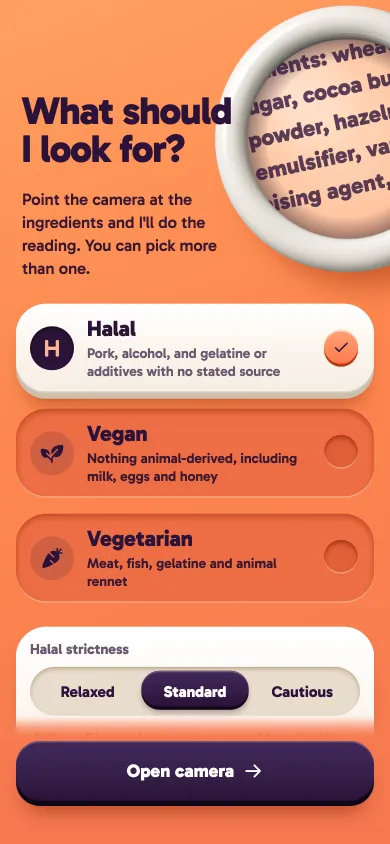
Your profiles
One scan, a verdict for each of your choices.
Pick vegan, vegetarian, halal, or any mix. Add your own avoid list. The lens lights up with the strictest result, and every flag comes with its reason.
- ✓ No concerns found nothing on the label conflicts with your choices
- ! Doubtful source not stated; could go either way
- × Not suitable the label names something you avoid
- ½ List incomplete part of the list couldn't be read
carmine (E120) Made from cochineal insects.
gelatine Source not stated (could be pork, beef or fish).
palm oil On your list: palm oil.
Privacy, plainly
No account. No ads. No tracking.
Nothing to sign up for
No account, no email, no login. Ingrisee has no analytics or advertising SDKs.
Photos are read, not kept
The label photo goes to OpenAI to be read and is not saved by Ingrisee, on your phone or on our side.
Your settings stay local
Profiles, language and your avoid list live on your phone. Delete the app and they are gone.
Guides
Get better reads, understand more.
How to scan a label well
Light, distance, steadiness and angle: how to get a clean read of an ingredients list on the first try.
Reading E-numbers and additives
What E-numbers are, how they are grouped, and why some of them can come from plants, animals or synthesis.
Choosing your diet settings
How the vegan, vegetarian and halal profiles work, what each one looks for, and how the halal strictness levels differ.
Using your avoid list
Add your own ingredients to skip, such as mushroom, palm oil, sesame or E621, and Ingrisee checks every label for them.
Torn, curved, tiny or partial labels
What to do when the list is cut off, wraps around a bottle, is printed very small, or sits behind glare.
Understanding your results
What "No concerns found", "Suspicious", "Not suitable" and "List incomplete" mean, and when to use the detailed check.
Does Ingrisee need a barcode or a product database?
No. Ingrisee reads the ingredients text printed on the package you are holding. It works for products that are not in any database, local brands, and imports with labels in other languages.
Which languages can it read?
Labels in almost any language, including multilingual labels. The app itself is available in English, Turkish, German, Spanish, Portuguese (Brazil) and Arabic, and explains ingredients in the app language you choose.
Is Ingrisee a halal, vegan or allergy certificate?
No. Ingrisee is an informational reading aid. It can only see what is printed on the label, and AI can make mistakes. The label, the manufacturer and the relevant certification body always have the final word. For allergies or medical needs, always check the label yourself and talk to a professional.
What happens to the photo of the label?
To read a label, the photo is sent over an encrypted connection to OpenAI, the AI service that reads it. Ingrisee does not save the photo on your phone or in your photo library, and does not keep it on its own servers. Details are in the Privacy Policy.
Do I need an account?
No. There is no sign-up and no login. Your profile choices, language and avoid list are saved only on your phone.
Can I pick more than one diet?
Yes. Choose any combination of vegan, vegetarian and halal, and add your own avoid list on top. Each result shows a verdict for every profile you selected.
What does "List incomplete" mean?
Part of the ingredients list was cut off, curved out of view, or unreadable. Ingrisee tells you so instead of guessing. Retake the photo showing the whole list.
Does it work offline?
No. Reading a label needs an internet connection, because the AI model runs in the cloud.
Which devices are supported?
iPhone with iOS 15.0 or later.

Turn it over. Point. Know.
Ingrisee for iPhone. Coming soon to the App Store.
Coming soon to theApp StoreAI can make mistakes. Ingrisee is not a certificate and not medical or religious advice. Disclaimer